2026 Top Types of Industrial Managed PoE Switches for Buyers

Industrial networks rarely fail at a convenient time. A camera may lose power near a loading dock, or a control link may drop inside a warm, dusty cabinet. In 2026, buyers need to compare more than port counts. An Industrial Managed Poe Switch should match the site’s power budget, temperature range, mounting space, and network design. Small details matter.

This introduction surveys common options, including DIN-rail models for control cabinets, rackmount switches for equipment rooms, and compact units for space-limited installations. It also explains how PoE and PoE+ support cameras and access points, while higher-power PoE models can serve more demanding devices. Check the total power budget, not just the wattage listed for one port. Fiber uplinks, VLANs, ring redundancy, and remote monitoring may also shape the right choice.

A spec sheet is only a starting point. A switch rated for a wide temperature range may still need careful enclosure placement and airflow. Buyers should confirm management features, port speed, surge protection, warranty terms, and compatibility with existing devices before ordering. For critical links, consider what happens when a power supply or cable fails. Not every network needs advanced Layer 3 functions, and extra features can add setup work. That trade-off deserves a second look. The sections ahead offer a practical framework for comparing switch types by installation, power needs, resilience, and maintenance—not by headline specifications alone.
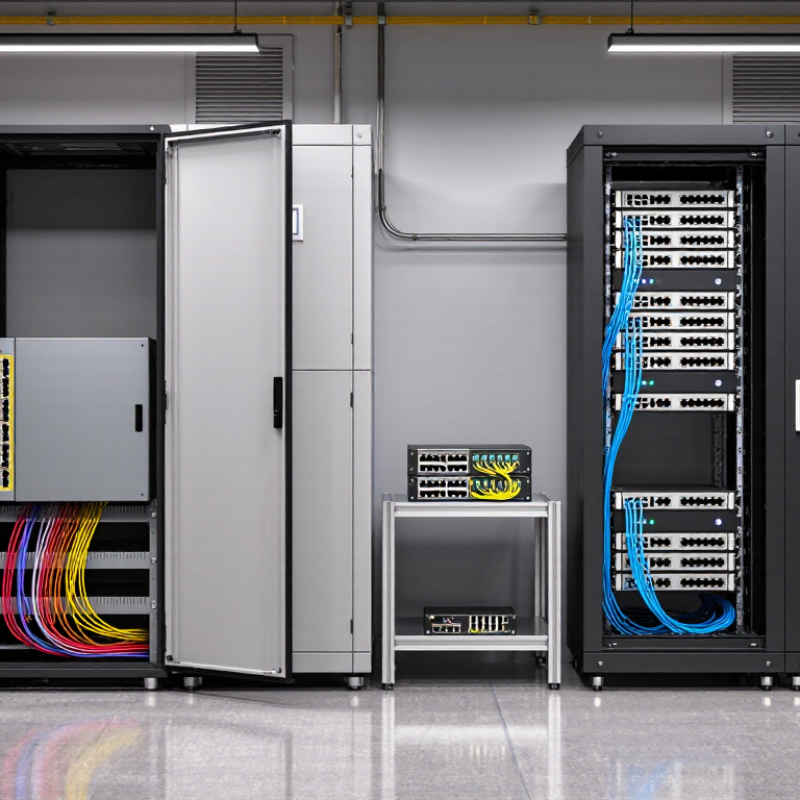
2026 Top Types of Industrial Managed PoE Switches for Buyers

What Industrial Managed PoE Switches Are and How They Work

Industrial managed Power over Ethernet (PoE) switches combine network data, device power, and traffic controls in one rugged enclosure. They connect equipment such as cameras, wireless access points, and sensors through Ethernet cables. The switch receives power from an external supply, then delivers it to compatible devices through selected ports. Its management interface lets technicians monitor port status, organize network traffic, and check power use. If a camera goes offline, port diagnostics may help identify a cable or power issue. They cannot replace a physical inspection.

Tips: Check each device’s power requirement against both the switch’s per-port limit and its total PoE budget. Allow headroom for startup peaks. Use suitable industrial cabling where heat, vibration, or electrical noise may affect connections. Test the route in place. Small details matter.

A managed switch can also support network segmentation and traffic prioritization, which helps keep video streams from crowding out control data. Before installation, confirm the available power supply, operating temperature range, and mounting space. Record port settings so another technician can understand the setup later. In practice, documentation is easy to postpone—and harder to reconstruct after a fault.

2026 Top Types of Industrial Managed PoE Switches for Buyers: What They Are and How They Work

Industrial managed PoE switches combine network management features with Power over Ethernet, delivering data and electrical power over a single Ethernet cable. The chart compares the maximum power supplied per port under common IEEE PoE standards. Actual switch-wide power budgets vary by model and power supply; check the manufacturer’s specifications when sizing a network.

Core Features That Distinguish Managed PoE Switches

Core Features That Distinguish Managed PoE Switches

Industrial managed PoE switches do more than deliver power and data. They let operators separate camera, sensor, and control traffic with VLANs, then prioritize time-sensitive packets using quality-of-service settings.

HMS Networks’ 2024 Industrial Network Market Shares report estimated that industrial Ethernet accounted for 71% of newly installed network nodes. That shift makes traffic visibility and fault isolation practical priorities, not optional extras. Still, the figure describes new nodes, not every factory network.

Power management matters just as much.

IEEE 802.3bt supports up to 90 watts of power from the source, but actual device draw, cable length, and total switch budget affect deployment choices. Check per-port allocation and remaining PoE capacity before connecting a heater-equipped camera or several access points.

Look for port-level power cycling, SNMP monitoring, and clear alarms; these can help pinpoint a failed link without sending a technician across a noisy production floor. Useful details.

Ring redundancy can restore connectivity after a cable break, while rated operating temperatures and surge protection help a switch withstand harsh cabinets. Yet specifications do not replace site testing. A setting that works on a bench may behave differently beside motors and long cable runs.

Major Types of Industrial Managed PoE Switches in 2026

Major Types of Industrial Managed PoE Switches in 2026

Industrial managed PoE switches generally fall into cabinet, rack-mount, fiber-uplink, and high-power categories. Compact DIN-rail models suit control cabinets, where space is tight and vibration is routine. Their management features commonly include VLANs, traffic prioritization, and network redundancy. Rack-mount switches offer higher port counts for control rooms and larger aggregation points. They can simplify centralized monitoring, but may be excessive for a small machine cell.

Fiber-uplink models pair copper PoE access ports with fiber connections between buildings or production areas. This helps cover longer distances and reduce exposure to electrical interference. High-power models support PoE+ or IEEE 802.3bt PoE++, useful for power-hungry cameras, access points, and other edge devices. IEEE 802.3bt permits up to 90 watts at the power-sourcing equipment; actual device power is lower after cable losses. Check the device’s required wattage, not just the switch’s advertised total.

The wider industrial Ethernet market is expanding. MarketsandMarkets’ 2023 Industrial Ethernet Market report estimated growth from USD 10.1 billion in 2023 to USD 13.7 billion by 2028, a 6.3% compound annual growth rate. That figure covers industrial Ethernet broadly, not PoE switches alone. In practice, buyers should also check operating-temperature ratings, redundant power inputs, and available PoE budget under full load. The awkward detail: a switch may meet the port count on paper, yet run short when every endpoint draws power at once.

2026 Top Types of Industrial Managed PoE Switches for Buyers — Major Types of Industrial Managed PoE Switches in 2026

This comparison covers common product types and design approaches. Categories can overlap—for example, a DIN-rail switch may also provide Gigabit ports and fiber uplinks. IEEE figures below are maximum power supplied per port; the usable power at a powered device and the total switch budget depend on cabling and the specific model.

Switch type PoE standard and maximum per-port output Typical port and uplink configuration Common applications Buyer considerations
Industrial PoE switch IEEE 802.3af (PoE); up to 15.4 W at the power-sourcing equipment (PSE) Often 10/100 Mb/s or Gigabit access ports, with one or more Ethernet uplinks Basic IP phones, simple sensors, and lower-power fixed cameras Check the device’s actual power requirement, total PoE budget, network bandwidth, and whether older endpoints require 802.3af compatibility.
Industrial PoE+ switch IEEE 802.3at (PoE+); up to 30 W at the PSE Commonly multiple 10/100/1000 Mb/s PoE+ ports and dedicated uplinks IP cameras with heaters or pan-tilt-zoom functions, wireless access points, and other mid-power devices Confirm both the per-port limit and the switch’s aggregate PoE budget; the total budget is shared across powered ports.
Industrial 4-pair PoE Type 3 switch IEEE 802.3bt Type 3; up to 60 W at the PSE Typically Gigabit access ports; the number of Type 3 ports varies by model and power supply Higher-power access points, multi-sensor cameras, and industrial terminals with elevated power needs Verify endpoint compatibility, supported PoE mode, cabling requirements, and how many ports can deliver the specified power simultaneously.
Industrial 4-pair PoE Type 4 switch IEEE 802.3bt Type 4; up to 90 W at the PSE Usually a selected set of high-power Gigabit ports rather than every port on the switch Compatible high-power terminals, lighting, displays, and other devices designed for 4-pair PoE Check the endpoint’s negotiated power class, per-port and aggregate limits, input-power capacity, and thermal derating specifications.
Gigabit industrial managed PoE switch May support 802.3af, 802.3at, or 802.3bt, depending on the model Gigabit copper access ports; uplinks may be copper, fiber, or both High-resolution video, Wi-Fi access points, and networks carrying multiple concurrent data streams Match port speed to endpoint traffic and uplink capacity. Gigabit Ethernet over compliant copper cabling commonly supports a 100 m channel.
Fiber-uplink industrial managed PoE switch PoE standard depends on the copper access ports; fiber uplinks do not carry PoE PoE copper access ports with one or more fiber interfaces, often using pluggable optical modules Long-distance connections between cabinets, buildings, or electrically noisy locations Choose fiber type, connector, optical reach, and uplink speed for the link. Confirm the access-port power budget separately.
Compact DIN-rail industrial managed PoE switch PoE capability varies by model and may include 802.3af, 802.3at, or 802.3bt Small port count in a cabinet-friendly enclosure; commonly DC-powered, with copper or fiber uplinks Machine cells, roadside cabinets, utility sites, and space-constrained control panels Check mounting and clearance, DC input range, grounding, vibration specifications, and the stated operating-temperature range.
High-port-count industrial managed PoE switch PoE standard varies by port group and model; aggregate output is limited by the switch power system Many access ports, often with higher-speed uplinks for aggregation Large camera installations, factory floors, and centralized edge cabinets Calculate simultaneous endpoint demand rather than adding port maxima alone. Review power-supply redundancy, cooling, cabinet space, and uplink capacity.

Industrial Applications for Each Switch Type

Compact DIN-rail managed PoE switches suit machine cells, roadside cabinets, and small water-treatment stations. Their narrow housings fit beside relays and controllers, while VLANs separate cameras from control traffic. Small footprint matters. Check operating temperature and total PoE budget before mounting one inside a sealed cabinet.

Rackmount industrial switches are useful in factory control rooms, transport hubs, and larger security installations. They bring many camera and access-point connections together in one cabinet. Fiber-uplink models fit long runs between buildings or production areas, where electrical noise can disrupt copper links. Link redundancy can keep traffic moving after a cable failure, but it cannot fix poor network planning.

High-power PoE models support devices such as PTZ cameras, wireless access points, and some outdoor terminals. Confirm each device’s power demand, especially during startup or cold weather. Managed features such as traffic prioritization and port monitoring help teams spot faults sooner. A common planning mistake is choosing by port count alone. I would revisit that decision when spare capacity, heat, and future devices were not considered. Not always easy. A clear port map helps technicians trace a disconnected camera without guessing.

How Buyers Can Compare and Select the Right Switch

A buyer should begin with the installation, not the port list. Count the cameras, access points, and other powered devices, then leave room for planned additions. An eight-port switch may look sufficient, but its total PoE budget matters as much as its port count. Check the power available per port against each device’s actual requirement. Keep a margin.

Next, compare the environment and network design. A cabinet beside a production line may face vibration, dust, and wide temperature swings. Check the switch’s stated operating range and mounting options against site conditions. For long links between cabinets, fiber uplinks can help avoid distance limits on copper. Managed features also vary: VLANs separate traffic, while ring or link redundancy can help maintain connections after a cable fault. Confirm that the features match the network team’s ability to configure and maintain them.

Do not select by feature count alone. A more advanced switch can add configuration work that a small site does not need. Review the PoE standard, total power budget, uplink speed, management tools, and recovery behavior together. Ask for test results or clear documentation, especially for temperature and power performance. One detail is easy to overlook: connected devices may draw more power during startup than during normal use. There is no perfect checklist. Revisit the choice after a pilot installation, because real cable routes and device loads can expose assumptions that looked reasonable on paper.

Stay in touch with the latest National Luna Products and News!